في هذا المقال
How to Choose the Best Baby Monitor?
The best baby monitor is one that gives you a clear view or sound of your baby, offers a reliable connection, and has features that suit your daily routine. When choosing a baby monitor, consider video quality, night vision, audio, connection type, range, alerts, camera movement, and features such as two-way talk or temperature monitoring.
With many baby monitors available today, it can be difficult to know which features are actually useful. The right choice depends on your baby's age, where the monitor will be used, and how much visibility you want while your baby sleeps or plays.
What Should You Look for in a Baby Monitor?
Before buying a baby monitor, consider the features that will make monitoring your little one easier and more convenient.
1. Clear Video Quality
A monitor should provide a clear image so you can easily check on your baby without needing to enter the room.
Look for a camera with good image quality that shows enough detail to see your baby's position, movements, and surroundings. A wider viewing angle can also be useful if the camera needs to cover a cot or play area.
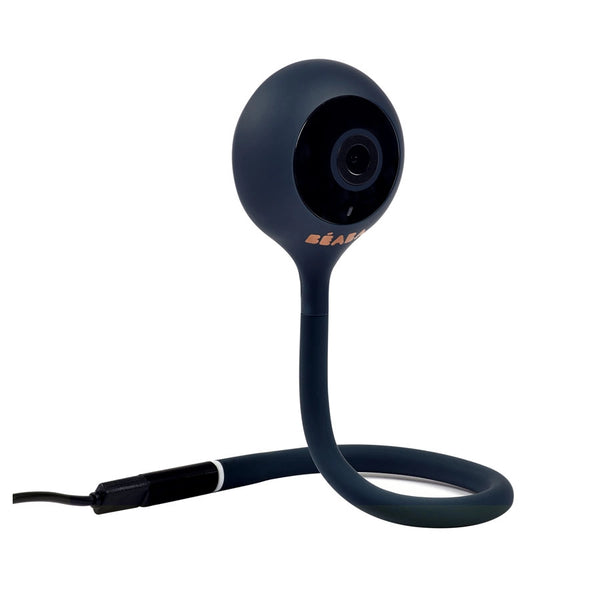
Brands such as Nanit, Motorola, Chillax, Hubble, Beaba, and Arenti offer different baby monitoring options with varying camera and viewing features.
2. Good Night Vision
Babies spend a lot of time sleeping, so night vision is an important feature to consider.
Infrared night vision allows you to see your baby in low-light or dark conditions without turning on bright lights that could disturb their sleep. Check how clearly the monitor displays the room at night and whether the camera automatically switches between day and night viewing.
3. Reliable Audio
A baby monitor should let you hear your baby clearly.
Two-way audio can be particularly useful because it allows you to speak to your baby through the monitor. For example, you may be able to reassure your baby with your voice before going into the room.
When comparing models, look for clear sound and features that reduce background noise or unwanted audio interference.
4. Check the Connection Type
Baby monitors can use different types of connections, including dedicated parent units, Wi-Fi, or a combination of both.
A monitor with a dedicated parent screen can be convenient when you want a simple setup without relying entirely on your phone. Wi-Fi monitors, meanwhile, can allow parents to view the camera through a smartphone app when supported.
Consider where you plan to use the monitor and whether you want access only at home or from different locations.
5. Look for a Suitable Range
The monitor should provide a connection that works well throughout the areas where you normally spend time.
If your baby's room is upstairs or at the opposite end of your home, check the manufacturer's stated range and consider the layout of your house.
For Wi-Fi models, your home's internet connection can also affect how smoothly the video and audio work.
6. Consider Camera Movement
A camera with adjustable positioning can make it easier to monitor a larger area.
Some baby monitors allow you to adjust the camera angle manually, while others offer remote movement or wider views. This can be helpful as your baby grows and starts moving around more.
Think about whether you only need to monitor a cot or whether you want coverage of a larger nursery or play area.
7. Look for Useful Alerts
Some baby monitors can send notifications when they detect certain sounds or movements.
Depending on the model, alerts may help notify you when your baby cries or when activity is detected. These features can be useful when you are in another room or busy with household tasks.
However, it is important to understand what each alert actually detects before relying on it.
8. Check for Temperature and Room Monitoring
Some baby monitors provide additional information about the nursery environment.
Temperature monitoring can help parents keep an eye on the room while their baby sleeps. Depending on the model, you may also find features such as humidity readings or other environmental information.
If maintaining a comfortable nursery environment is important to you, check whether the monitor provides these features and how the information is displayed.
9. Consider Two-Way Talk
Two-way communication allows you to speak through the baby monitor.
This can be useful when your baby makes a small noise and you want to provide reassurance without immediately entering the room. It can also be handy for communicating with another caregiver nearby.
If you plan to use this feature frequently, look for a monitor with clear microphone and speaker quality.
10. Think About App Features
Wi-Fi baby monitors often connect to a smartphone application.
An app may allow you to view live video, receive notifications, adjust settings, or access additional monitoring features. Before choosing a smart baby monitor, check whether the app is compatible with your phone and whether its features are easy to use.
Models from brands such as Nanit, Arenti, Motorola, and Hubble can offer connected monitoring options, depending on the specific model.
Baby Monitor Features at Different Stages
Your requirements may change as your baby grows.
For Newborns
For a newborn, parents may prioritise:
- Clear night vision
- Reliable audio
- Stable connection
- Two-way talk
- Easy camera positioning
- Temperature monitoring
A simple monitor with dependable basic functions may be enough for many newborn routines.
For Older Babies
As babies become more active, a wider camera view can become increasingly useful. Movement alerts and the ability to monitor a larger area may also be helpful once your baby starts rolling, crawling, or spending more time playing.
Should You Choose a Wi-Fi Baby Monitor?
A Wi-Fi baby monitor can be a good option if you want to check on your baby using a smartphone or tablet.
However, consider your internet connection, app requirements, privacy settings, and how you want to access the camera.
If you prefer a more straightforward setup, a monitor with a dedicated parent unit may be more suitable.
There is no single connection type that works best for every family. Your choice should match how and where you plan to use the monitor.
Baby Monitor Brands to Consider
Different brands offer different combinations of monitoring features.
Nanit is known for connected baby monitoring products and smart features designed around nursery monitoring.
Motorola offers a range of baby monitors, including models with video and audio monitoring features.
Chillax provides baby monitoring options with features designed for everyday use.
Hubble offers connected baby monitoring products with features that can help parents keep an eye on their little ones.
Beaba also offers baby monitoring products designed to fit into everyday nursery routines.
Arenti focuses on smart monitoring products with connected features for parents who want to monitor their baby's room through compatible devices.
When comparing these brands, focus on the features offered by the specific model rather than choosing based on the brand name alone.
Baby Monitor Safety and Privacy Tips
A baby monitor is designed to help you monitor your baby, but it should be installed and used carefully.
Keep these points in mind:
- Position the camera securely and according to the manufacturer's instructions.
- Keep cords well away from the cot and your baby's reach.
- Avoid placing the camera where it could fall into the sleeping area.
- Use strong, unique passwords for Wi-Fi-connected monitors.
- Keep the monitor's app and firmware updated when updates are available.
- Review privacy and account settings regularly.
- Follow the manufacturer's installation and usage instructions.
A camera should also never replace safe sleep practices or regular supervision.
A Simple Checklist Before Buying a Baby Monitor
Before making your choice, ask yourself:
Where will I use it?
Consider the distance between the baby's room and the areas where you spend time.
Do I want a screen or smartphone access?
A dedicated parent unit and a Wi-Fi app provide different monitoring experiences.
Do I need night vision?
For nighttime monitoring, clear low-light viewing is highly useful.
Do I need two-way talk?
This can be convenient for reassuring your baby from another room.
Do I need room monitoring?
Temperature and other environmental features may be useful depending on your routine.
How much camera coverage do I need?
Consider whether you need to monitor only the cot or a larger room.
Which features will I actually use?
Choose useful functions rather than paying for features you are unlikely to need.
Choosing the best baby monitor comes down to finding the right balance of clear video, reliable audio, night vision, connection, camera coverage, alerts, and useful smart features for your family's routine.
Before buying, consider where you will place the monitor, how you want to view your baby, and which features matter most to you. Brands such as Nanit, Motorola, Chillax, Hubble, Beaba, and Arenti offer different options, making it easier to compare features based on your needs.
A good baby monitor should make everyday monitoring more convenient while fitting naturally into your nursery routine.